Connect QuickBooks so CentSight can read your financial data and start building your dashboard. It takes about two minutes.
Before you start
- CentSight works with QuickBooks Online.
- You need to be an admin on the QuickBooks account. That is usually the founder, the CEO, or your accountant.
Connect QuickBooks
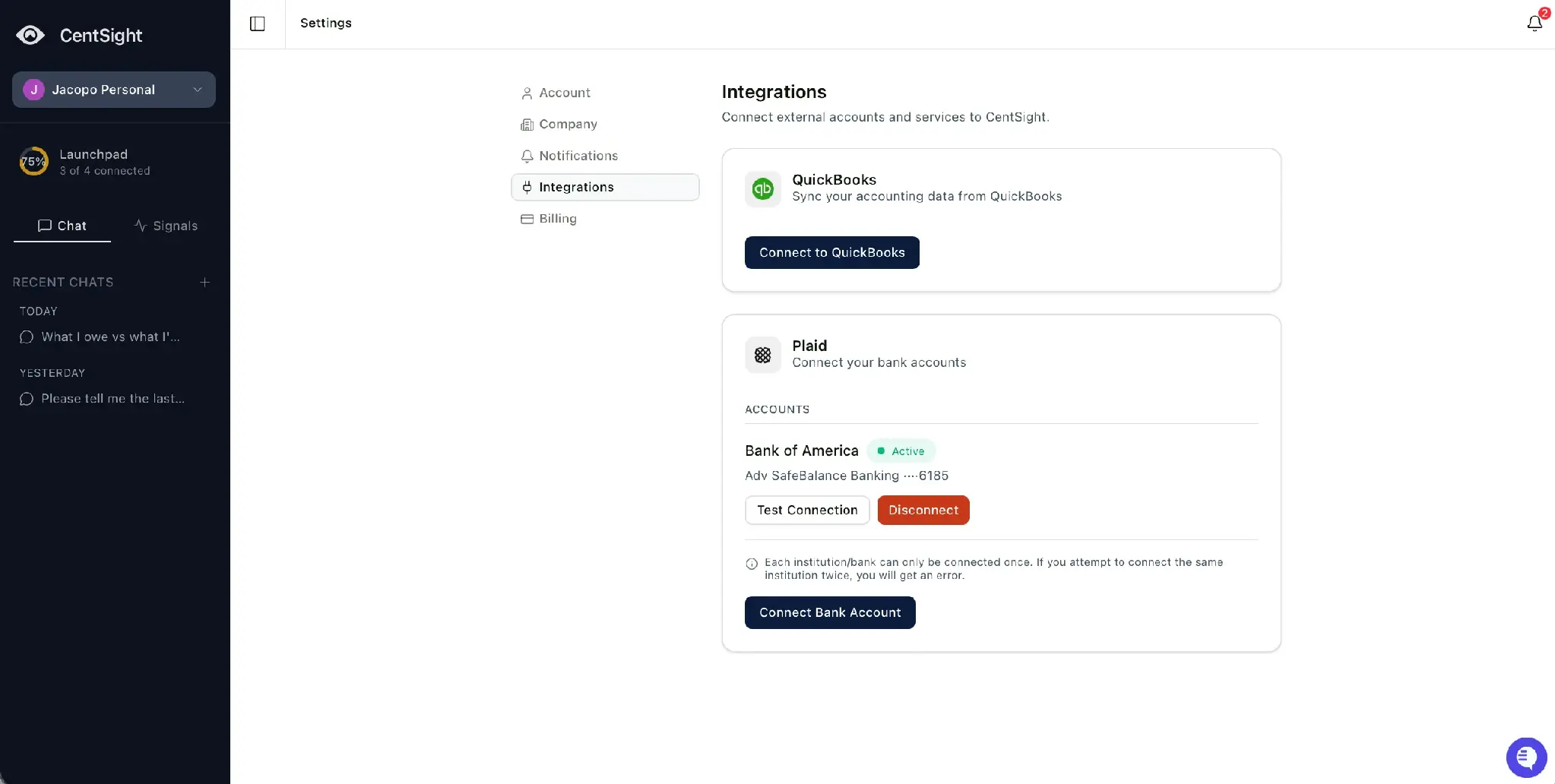
- Open Settings, then Integrations, and select Connect to QuickBooks.
- Sign in on QuickBooks' own login screen with the email you use for QuickBooks.
- If you manage more than one company, QuickBooks shows the companies under your account. Choose the one you want CentSight to read.
- Review the access request and approve it. CentSight asks for read-only access, so it can read your books without changing anything in them.
That is it. CentSight starts reading your books right away.
What happens next
Your dashboard starts to fill in, and CentSight can answer questions about your revenue, expenses, and runway. It reads QuickBooks in real time, so the numbers reflect your current books whenever you ask.
Good to know
- One company at a time. CentSight connects to a single QuickBooks company. To switch, disconnect the current one and connect the new company.
- Read-only. CentSight reads your QuickBooks data and never changes your records.
- Disconnect whenever you want, from Settings › Integrations.